January 2, 2012
//status update 02
past few months have been quite stressful, due new responsibilities. Hopefully I will resume working on my personal projects soon. Unfortunately the BGE AirRace project is dead, but I don't feel too bad about it. It has gave me new 3D models, ideas and shaders to share with. 2012 comes also with few new ideas which I have been working on past few days. Particularly interesting is a precedural volumetric planetary rendering engine. Right now it can render a planet in any size with only 12 triangles. I will write a separate topic about it.

December 20, 2011
free classic Tron lightcycle model
I have a Tron lightcycle fan game in progress.. well actually the project has stalled for exactly a year. I started wiping the dust off the project and try to finally finish a game. It means rewriting most of the code since it was made in Blender 2.49 and cleaning up it a bit. The only finished thing in the game is the lightcycle itself which I modeled from various references and blueprints from original Tron movie (1982).
some pictures of the project work in progress:


movie
cycle:


blend HERE
obj coming soon...
some pictures of the project work in progress:


movie
cycle:


blend HERE
obj coming soon...
free low-poly shotgun model
This is an old low-poly shotgun model (from 2006) I made for testing purposes. It has been serving me well and I though I should share it with anyone.

This work is licensed under a Creative Commons Attribution-ShareAlike 3.0 Unported License
so basically you can do anything with it.
1314 triangles
1024x1024 diffuse texture


blend HERE
obj mesh file + texture HERE
This work is licensed under a Creative Commons Attribution-ShareAlike 3.0 Unported License
so basically you can do anything with it.
1314 triangles
1024x1024 diffuse texture


blend HERE
obj mesh file + texture HERE
December 19, 2011
GLSL depth of field with bokeh v2.4
here is a new update on the depth of field shader.
changes:
• again totally redone the depth of field calculation with 2 possible options:
- Physically accurate DoF simulation calculated from "focalDepth" ,"focalLength", "f-stop" and "CoC" parameters.
- Manual - artist controlled DoF simulation calculated only from "focalDepth" and individual controls for near and far blur planes.
• added "circe of confusion" (CoC) parameter in mm to accurately simulate DoF with different camera sensor or film sizes.
• optical lens vignetting factor based on f-stop value and user defined properties.
• cleaned up the code
• some optimization
Shader is HERE
Blend is HERE
controls:
Mouse+WASD - look/movement
LMB - drag the focal point object
1 - enables DoF rendering
spacebar - toggles debug view
Up/Down arrowkeys - zoom in/out (changes focal length)
Left/Right arrowkeys - changes f-stop value
changes:
• again totally redone the depth of field calculation with 2 possible options:
- Physically accurate DoF simulation calculated from "focalDepth" ,"focalLength", "f-stop" and "CoC" parameters.
- Manual - artist controlled DoF simulation calculated only from "focalDepth" and individual controls for near and far blur planes.
• added "circe of confusion" (CoC) parameter in mm to accurately simulate DoF with different camera sensor or film sizes.
• optical lens vignetting factor based on f-stop value and user defined properties.
• cleaned up the code
• some optimization
Shader is HERE
Blend is HERE
controls:
Mouse+WASD - look/movement
LMB - drag the focal point object
1 - enables DoF rendering
spacebar - toggles debug view
Up/Down arrowkeys - zoom in/out (changes focal length)
Left/Right arrowkeys - changes f-stop value
December 13, 2011
SSAO shader update v1.2
December 9, 2011
GLSL depth of field with bokeh v2.3
This is a major update for my depth of field w. bokeh shader.
I have added a python lens control file which gets focus distance from an object, adds control of "f-stop" variable, which controls "aperture" value for the shader.
list all of the new features:
• new and physically more accurate DoF, using real lens equations
• two extra input variables - focal length (in mm), aperture iris diameter (in mm)
• added a debug visualization of focus point and focal range (red line = focal point, green area = focal range)
separate python file:
• sets focus distance from an object
• added slow adaptive focusing for natural feel
• option to control aperture diameter with f-stop values (range: f/1, f/1.4, f/2, f/2.8, f/4, f/5.6, f/8, ..... f/256)
• focal length control (default range from 6mm to 600mm)
Shader is HERE
lens control file HERE (made for Blender)
Blend is HERE

debug focal plane and depth range visualization:

v2.2 was done yesterday and I just did not had the time to post it here.
I have added a python lens control file which gets focus distance from an object, adds control of "f-stop" variable, which controls "aperture" value for the shader.
list all of the new features:
• new and physically more accurate DoF, using real lens equations
• two extra input variables - focal length (in mm), aperture iris diameter (in mm)
• added a debug visualization of focus point and focal range (red line = focal point, green area = focal range)
separate python file:
• sets focus distance from an object
• added slow adaptive focusing for natural feel
• option to control aperture diameter with f-stop values (range: f/1, f/1.4, f/2, f/2.8, f/4, f/5.6, f/8, ..... f/256)
• focal length control (default range from 6mm to 600mm)
Shader is HERE
lens control file HERE (made for Blender)
Blend is HERE

debug focal plane and depth range visualization:

v2.2 was done yesterday and I just did not had the time to post it here.
December 8, 2011
BGE impossibe box
This is a remake of Portal 2: Impossible Box seen here - http://www.youtube.com/watch?v=JAvbdU5NIyw
I made it to test out my remote portal system using multiple viewports and a GLSL stenciling.

blend file HERE
I made it to test out my remote portal system using multiple viewports and a GLSL stenciling.

blend file HERE
November 28, 2011
basic deferred shading system in GLSL
Today I made a basic deferred renderer as an exercise in a single shader using only depth buffer and inverse modelview matrix as input.
Normals and position are calculated from depth buffer. Unfortunately normals are flat shaded using this method and the shader itself is quite slow, but maybe someone finds the parts of this shader useful.

blend:
HERE
fragment shader (code is quite messy) :
HERE
Normals and position are calculated from depth buffer. Unfortunately normals are flat shaded using this method and the shader itself is quite slow, but maybe someone finds the parts of this shader useful.

blend:
HERE
fragment shader (code is quite messy) :
HERE
November 22, 2011
GLSL depth of field with bokeh v2.1
This is an update from the previous post on DoF bokeh shader.
The main addition is an option of pentagonal shape bokeh. The technique is hackish, but it works. Still I am looking for a more simpler way to make procedural n-gonal shapes of sampling.
The shader is made on 2006 iMac with Mobility Radeon card so it should work on any hardware supporting OpenGL
Screenshots are captured with high sample count, but the point is to show the features and capabilities of the shader.
some of the main features explained with images:
threshold & gain:
brings out highlights by "threshold" value and enhances them with "gain"
as you can see this is the main part that makes the distinct look of the bokeh blur. Without bringing out highlights, the blur looks like just a regular circular blur.


fringe:
adds chromatic aberration for the blur (small overlay image shows r,g,b color offset of the sample)

bias:
shifts the weights of the samples on the bokeh edges


pentagon:
pentagon shape of the bokeh (still needs some work)
edit: i have removed the "scale" factor, it is now automatic.


GLSL frag shader: HERE
The main addition is an option of pentagonal shape bokeh. The technique is hackish, but it works. Still I am looking for a more simpler way to make procedural n-gonal shapes of sampling.
The shader is made on 2006 iMac with Mobility Radeon card so it should work on any hardware supporting OpenGL
Screenshots are captured with high sample count, but the point is to show the features and capabilities of the shader.
some of the main features explained with images:
threshold & gain:
brings out highlights by "threshold" value and enhances them with "gain"
as you can see this is the main part that makes the distinct look of the bokeh blur. Without bringing out highlights, the blur looks like just a regular circular blur.


fringe:
adds chromatic aberration for the blur (small overlay image shows r,g,b color offset of the sample)

bias:
shifts the weights of the samples on the bokeh edges


pentagon:
pentagon shape of the bokeh (still needs some work)
edit: i have removed the "scale" factor, it is now automatic.


GLSL frag shader: HERE
October 26, 2011
GLSL depth of field with bokeh v2
This is my second attempt to create a depth of field shader with bokeh. the first one is here:
http://artmartinsh.blogspot.com/2010/02/glsl-lens-blur-filter-with-bokeh.html
And I am really glad that it got popular quite fast.
This one is much more flexible and I have added few new features.
• variable sample count to increase quality/performance
• option to blur depth buffer to reduce hard edges
• option to dither the samples with noise or pattern
• bokeh chromatic aberration/fringing
• bokeh bias to bring out bokeh edges
• image thresholding to bring out highlights when image is out of focus
yet to do
• add multi-shape bokeh (does anyone knows how to make procedural pentagon or hexagon?)
• bokeh vignetting at screen edges
• some minor fixes
screenshots:


fragment shader HERE
http://artmartinsh.blogspot.com/2010/02/glsl-lens-blur-filter-with-bokeh.html
And I am really glad that it got popular quite fast.
This one is much more flexible and I have added few new features.
• variable sample count to increase quality/performance
• option to blur depth buffer to reduce hard edges
• option to dither the samples with noise or pattern
• bokeh chromatic aberration/fringing
• bokeh bias to bring out bokeh edges
• image thresholding to bring out highlights when image is out of focus
yet to do
• add multi-shape bokeh (does anyone knows how to make procedural pentagon or hexagon?)
• bokeh vignetting at screen edges
• some minor fixes
screenshots:


fragment shader HERE
October 25, 2011
nicer SSAO
yet another screen-space ambient occlusion shader.
original technique is HERE by Arkano22.
I tuned it up a bit adding my circular texture sampling and pattern sample filtering.
Right now it is the best depth-only based SSAO I have come across.
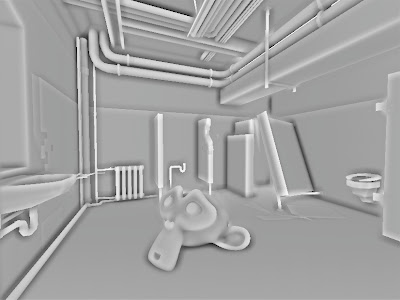
another screenshot with noise dithering and "garea = 0.4;" instead of "garea = 0.6;" to lighten scene a bit.
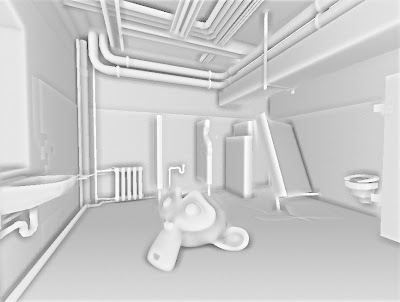
scene with and without ssao:

glsl frag shader HERE
and blend file HERE
original technique is HERE by Arkano22.
I tuned it up a bit adding my circular texture sampling and pattern sample filtering.
Right now it is the best depth-only based SSAO I have come across.

another screenshot with noise dithering and "garea = 0.4;" instead of "garea = 0.6;" to lighten scene a bit.

scene with and without ssao:

glsl frag shader HERE
and blend file HERE
October 13, 2011
NVIDIA FXAA
Antialiasing has been an exclusive thing for the PC gamers over the gaming consoles. Well of course if you could afford a proper GPU to play recent games in FullHD at 16xQMSAA... until now.
Recently I have been quite interested in post-process antialiasing approaches. They are really useful for deferred renderers and for lower-end PCs and Consoles as the antialiasing process is done after the rendering the scene - as a post-process filter, just like a color correction, SSAO, Depth of Field and HDR filters.
I first stumbled upon something that tried to imitate antialiasing was in Crysis - they extracted the edges of the rendered image , blurred the rendered image and mixed the unblurred and blurred image with edges as a mask. Since then over the time the quality has increased so much that post-process AA techniques are comparable to real antialiasing. Here are more popular ones I found: NFAA, DLAA, SSAA, MLAA, SRAA, SMAA, GBAA, GPAA and SDAA... yeah there are a lot of techniques to choose. I personally really like Humus techniques (last 3), but unfortunately they require additional buffers which I cannot access in BGE right now. But few of these techniques does not require any additional buffers at all, some of them uses depth buffer and normal buffer to find the edges.
Today I have here another post-rocess antialiasing approach - FXAA by Timothy Lottes at NVIDIA.
"Fast Approximate Antialiasing" is a new anti-aliasing technique, based on several existing anti-aliasing techniques, including MLAA. FXAA is being used in Battlefield 3, DeusEx:HE, F.E.A.R.3 .
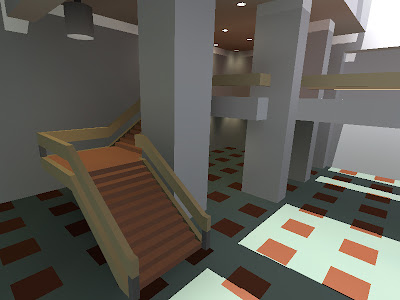
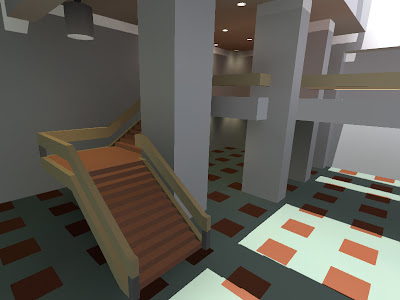
I really like FXAA because it requires only the rendered scene buffer as input and it is really simple to integrate in any game engine.
comparison shots by the Timothy himself from TheForceUnleashed2:
http://timothylottes.blogspot.com/2011/04/nvidia-fxaa-ii-for-console.html
screenshots from BGE:
without FXAA:
with FXAA
glsl fragment shader HERE
blend file for Blender 2.5x HERE
button 1 - disables FXAA
button 2 - anables it
Recently I have been quite interested in post-process antialiasing approaches. They are really useful for deferred renderers and for lower-end PCs and Consoles as the antialiasing process is done after the rendering the scene - as a post-process filter, just like a color correction, SSAO, Depth of Field and HDR filters.
I first stumbled upon something that tried to imitate antialiasing was in Crysis - they extracted the edges of the rendered image , blurred the rendered image and mixed the unblurred and blurred image with edges as a mask. Since then over the time the quality has increased so much that post-process AA techniques are comparable to real antialiasing. Here are more popular ones I found: NFAA, DLAA, SSAA, MLAA, SRAA, SMAA, GBAA, GPAA and SDAA... yeah there are a lot of techniques to choose. I personally really like Humus techniques (last 3), but unfortunately they require additional buffers which I cannot access in BGE right now. But few of these techniques does not require any additional buffers at all, some of them uses depth buffer and normal buffer to find the edges.
Today I have here another post-rocess antialiasing approach - FXAA by Timothy Lottes at NVIDIA.
"Fast Approximate Antialiasing" is a new anti-aliasing technique, based on several existing anti-aliasing techniques, including MLAA. FXAA is being used in Battlefield 3, DeusEx:HE, F.E.A.R.3 .
I really like FXAA because it requires only the rendered scene buffer as input and it is really simple to integrate in any game engine.
comparison shots by the Timothy himself from TheForceUnleashed2:
http://timothylottes.blogspot.com/2011/04/nvidia-fxaa-ii-for-console.html
screenshots from BGE:
without FXAA:

with FXAA

glsl fragment shader HERE
blend file for Blender 2.5x HERE
button 1 - disables FXAA
button 2 - anables it
GLSL Cubic Lens Distortion
Few years ago I ported HLSL Cubic Lens Distortion shader made by a really nice guy François Tarlier. I slightly modified it, but the algorithm basically is the same one used in SynthEyes.
I encourage to visit François homepage and blog for Blender, AfterFX, compositing, VFX and mathcmoving related stuff. He is a former Environment and VFX artist at Ubisoft hehe.
Here are few screenshots of the shader in action:
undistorted:

distorted w chromatic abberration and slight blurring at edges:

lens distortion & my BPCEM reflection scene:

a screenshot in my real-time snowflake growth demo with lens distortion shader applied:

more info about the snowflake project HERE
download link to snowflake demo blend (for Blender 2.5x & 2.6x):
HERE
download link to blend file for lens distortion demo (for Blender 2.5x & 2.6x):
HERE
controls: mouse&WASD - camera movement
1 - disables the filter
2 - enables the filter
glsl fragment shader:
http://dl.dropbox.com/u/11542084/lens_distortion
I encourage to visit François homepage and blog for Blender, AfterFX, compositing, VFX and mathcmoving related stuff. He is a former Environment and VFX artist at Ubisoft hehe.
Here are few screenshots of the shader in action:
undistorted:

distorted w chromatic abberration and slight blurring at edges:
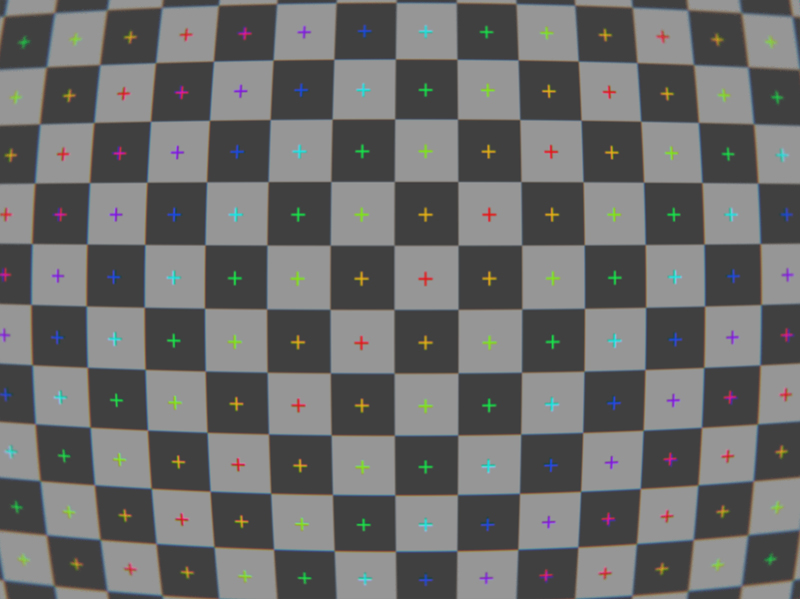
lens distortion & my BPCEM reflection scene:

a screenshot in my real-time snowflake growth demo with lens distortion shader applied:

more info about the snowflake project HERE
download link to snowflake demo blend (for Blender 2.5x & 2.6x):
HERE
download link to blend file for lens distortion demo (for Blender 2.5x & 2.6x):
HERE
controls: mouse&WASD - camera movement
1 - disables the filter
2 - enables the filter
glsl fragment shader:
http://dl.dropbox.com/u/11542084/lens_distortion
September 20, 2011
//status update 01
I have moved from Latvia to France. I dont have my own computer here and the appartment/survival problems are chasing me right now.
So I have stalled all of the personal projects for the moment till I get back on my feet. Till then I will be collecting and refurbishing my old work and I will be posting it here.
So I have stalled all of the personal projects for the moment till I get back on my feet. Till then I will be collecting and refurbishing my old work and I will be posting it here.
September 19, 2011
box projected cube environment mapping
I have been quite busy moving to another country, so nothing new this time. Oh, yeah, I added donate button, hehe.
BPCEM or box projected cube environment mapping is a cube environment mapping technique made by Bartosz Czuba http://devlog.behc.pl/. I thank him for helping me get this to work in BGE.
Regular Cube Environment Mapping is a very common technique of making fast fake reflections. It works best in outdoors, when reflecting distant skies and stuff that reaches to infinity, but looks very wrong in indoors, especially on flat surfaces, like walls and floor. It is caused by cube-map coordinates that reaches to infinity.
What BPCEM basically does, it takes the cube-map coordinates and clamps them to the size of the room. This technique only looks best in simple box shaped rooms. The original thread about BPCEM is HERE.
comparison stills (regular cube mapping vs BPCEM):
regular cubemap still looks fine on spheres, but wrong on flat surfaces.

All the difference makes these few lines of code:
vec3 bpcem (in vec3 v, vec3 eMax, vec3 eMin, vec3 ePos)
{
vec3 nrdir = normalize(v);
vec3 rbmax = (eMax - pos)/nrdir;
vec3 rbmin = (eMin - pos)/nrdir;
vec3 rbminmax;
rbminmax.x = (nrdir.x>0.0)?rbmax.x:rbmin.x;
rbminmax.y = (nrdir.y>0.0)?rbmax.y:rbmin.y;
rbminmax.z = (nrdir.z>0.0)?rbmax.z:rbmin.z;
float fa = min(min(rbminmax.x, rbminmax.y), rbminmax.z);
vec3 posonbox = pos + nrdir * fa;
return posonbox - ePos;
}
here is GLSL code: http://dl.dropbox.com/u/11542084/bpcem
and a .blend file: http://dl.dropbox.com/u/11542084/bpcem_playground.blend
BPCEM or box projected cube environment mapping is a cube environment mapping technique made by Bartosz Czuba http://devlog.behc.pl/. I thank him for helping me get this to work in BGE.
Regular Cube Environment Mapping is a very common technique of making fast fake reflections. It works best in outdoors, when reflecting distant skies and stuff that reaches to infinity, but looks very wrong in indoors, especially on flat surfaces, like walls and floor. It is caused by cube-map coordinates that reaches to infinity.
What BPCEM basically does, it takes the cube-map coordinates and clamps them to the size of the room. This technique only looks best in simple box shaped rooms. The original thread about BPCEM is HERE.
comparison stills (regular cube mapping vs BPCEM):
regular cubemap still looks fine on spheres, but wrong on flat surfaces.

All the difference makes these few lines of code:
vec3 bpcem (in vec3 v, vec3 eMax, vec3 eMin, vec3 ePos)
{
vec3 nrdir = normalize(v);
vec3 rbmax = (eMax - pos)/nrdir;
vec3 rbmin = (eMin - pos)/nrdir;
vec3 rbminmax;
rbminmax.x = (nrdir.x>0.0)?rbmax.x:rbmin.x;
rbminmax.y = (nrdir.y>0.0)?rbmax.y:rbmin.y;
rbminmax.z = (nrdir.z>0.0)?rbmax.z:rbmin.z;
float fa = min(min(rbminmax.x, rbminmax.y), rbminmax.z);
vec3 posonbox = pos + nrdir * fa;
return posonbox - ePos;
}
here is GLSL code: http://dl.dropbox.com/u/11542084/bpcem
and a .blend file: http://dl.dropbox.com/u/11542084/bpcem_playground.blend
Subscribe to:
Posts (Atom)