Labels

October 26, 2011

GLSL depth of field with bokeh v2

This is my second attempt to create a depth of field shader with bokeh. the first one is here:
http://artmartinsh.blogspot.com/2010/02/glsl-lens-blur-filter-with-bokeh.html
And I am really glad that it got popular quite fast.

This one is much more flexible and I have added few new features.

• variable sample count to increase quality/performance
• option to blur depth buffer to reduce hard edges
• option to dither the samples with noise or pattern
• bokeh chromatic aberration/fringing
• bokeh bias to bring out bokeh edges
• image thresholding to bring out highlights when image is out of focus

yet to do

• add multi-shape bokeh (does anyone knows how to make procedural pentagon or hexagon?)
• bokeh vignetting at screen edges
• some minor fixes

screenshots:


fragment shader HERE

October 25, 2011

nicer SSAO

yet another screen-space ambient occlusion shader.
original technique is HERE by Arkano22.
I tuned it up a bit adding my circular texture sampling and pattern sample filtering.
Right now it is the best depth-only based SSAO I have come across.


another screenshot with noise dithering and "garea = 0.4;" instead of "garea = 0.6;" to lighten scene a bit.


scene with and without ssao:


glsl frag shader HERE

and blend file HERE

October 13, 2011

NVIDIA FXAA

Antialiasing has been an exclusive thing for the PC gamers over the gaming consoles. Well of course if you could afford a proper GPU to play recent games in FullHD at 16xQMSAA... until now.
Recently I have been quite interested in post-process antialiasing approaches. They are really useful for deferred renderers and for lower-end PCs and Consoles as the antialiasing process is done after the rendering the scene - as a post-process filter, just like a color correction, SSAO, Depth of Field and HDR filters.
I first stumbled upon something that tried to imitate antialiasing was in Crysis - they extracted the edges of the rendered image , blurred the rendered image and mixed the unblurred and blurred image with edges as a mask. Since then over the time the quality has increased so much that post-process AA techniques are comparable to real antialiasing. Here are more popular ones I found: NFAA, DLAA, SSAA, MLAA, SRAA, SMAA, GBAA, GPAA and SDAA... yeah there are a lot of techniques to choose. I personally really like Humus techniques (last 3), but unfortunately they require additional buffers which I cannot access in BGE right now. But few of these techniques does not require any additional buffers at all, some of them uses depth buffer and normal buffer to find the edges.

Today I have here another post-rocess antialiasing approach - FXAA by Timothy Lottes at NVIDIA.
"Fast Approximate Antialiasing" is a new anti-aliasing technique, based on several existing anti-aliasing techniques, including MLAA. FXAA is being used in Battlefield 3, DeusEx:HE, F.E.A.R.3 .
I really like FXAA because it requires only the rendered scene buffer as input and it is really simple to integrate in any game engine.

comparison shots by the Timothy himself from TheForceUnleashed2:
http://timothylottes.blogspot.com/2011/04/nvidia-fxaa-ii-for-console.html

screenshots from BGE:

without FXAA:


with FXAA


glsl fragment shader HERE

blend file for Blender 2.5x HERE
button 1 - disables FXAA
button 2 - anables it

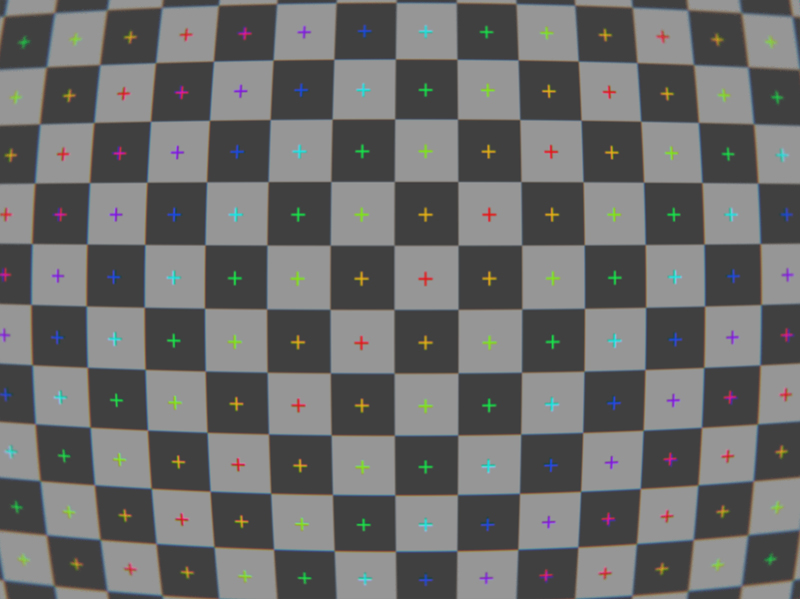
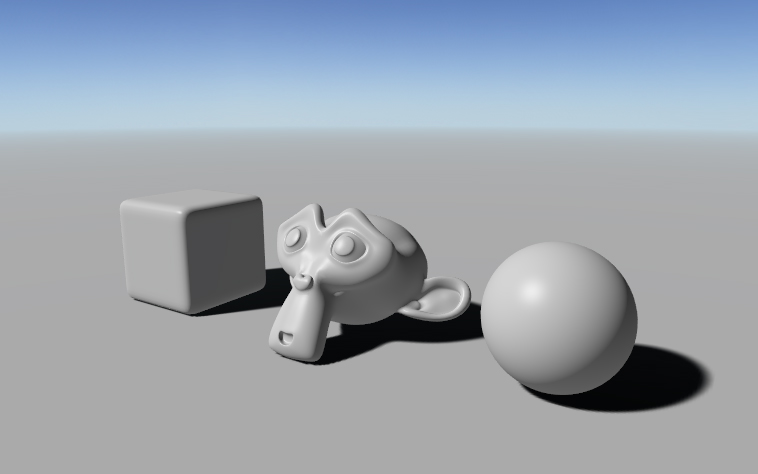
GLSL Cubic Lens Distortion

Few years ago I ported HLSL Cubic Lens Distortion shader made by a really nice guy François Tarlier. I slightly modified it, but the algorithm basically is the same one used in SynthEyes.
I encourage to visit François homepage and blog for Blender, AfterFX, compositing, VFX and mathcmoving related stuff. He is a former Environment and VFX artist at Ubisoft hehe.

Here are few screenshots of the shader in action:
undistorted:

distorted w chromatic abberration and slight blurring at edges:


lens distortion & my BPCEM reflection scene:


a screenshot in my real-time snowflake growth demo with lens distortion shader applied:

more info about the snowflake project HERE

download link to snowflake demo blend (for Blender 2.5x & 2.6x):
HERE

download link to blend file for lens distortion demo (for Blender 2.5x & 2.6x):
HERE

controls: mouse&WASD - camera movement
1 - disables the filter
2 - enables the filter

glsl fragment shader:
http://dl.dropbox.com/u/11542084/lens_distortion

September 20, 2011

//status update 01

I have moved from Latvia to France. I dont have my own computer here and the appartment/survival problems are chasing me right now.
So I have stalled all of the personal projects for the moment till I get back on my feet. Till then I will be collecting and refurbishing my old work and I will be posting it here.

September 19, 2011

box projected cube environment mapping

I have been quite busy moving to another country, so nothing new this time. Oh, yeah, I added donate button, hehe.

BPCEM or box projected cube environment mapping is a cube environment mapping technique made by Bartosz Czuba http://devlog.behc.pl/. I thank him for helping me get this to work in BGE.

Regular Cube Environment Mapping is a very common technique of making fast fake reflections. It works best in outdoors, when reflecting distant skies and stuff that reaches to infinity, but looks very wrong in indoors, especially on flat surfaces, like walls and floor. It is caused by cube-map coordinates that reaches to infinity.

What BPCEM basically does, it takes the cube-map coordinates and clamps them to the size of the room. This technique only looks best in simple box shaped rooms. The original thread about BPCEM is HERE.

comparison stills (regular cube mapping vs BPCEM):
regular cubemap still looks fine on spheres, but wrong on flat surfaces.


All the difference makes these few lines of code:


vec3 bpcem (in vec3 v, vec3 eMax, vec3 eMin, vec3 ePos)
{
vec3 nrdir = normalize(v);
vec3 rbmax = (eMax - pos)/nrdir;
vec3 rbmin = (eMin - pos)/nrdir;

vec3 rbminmax;
rbminmax.x = (nrdir.x>0.0)?rbmax.x:rbmin.x;
rbminmax.y = (nrdir.y>0.0)?rbmax.y:rbmin.y;
rbminmax.z = (nrdir.z>0.0)?rbmax.z:rbmin.z;
float fa = min(min(rbminmax.x, rbminmax.y), rbminmax.z);
vec3 posonbox = pos + nrdir * fa;
return posonbox - ePos;
}


here is GLSL code: http://dl.dropbox.com/u/11542084/bpcem

and a .blend file: http://dl.dropbox.com/u/11542084/bpcem_playground.blend

August 8, 2011

volume ray casting in BGE

Hey, I got volumetric ray casting to work in Blender Game Engine. The shader is fully done in GLSL, including front&back face calculation in single pass and 2D texture conversion to texture3D, so it should be reeaally easy to implement in every OpenGL supporting engine.

The blend. file is here:
DOWNLOAD

volume texture:
DOWNLOAD

glsl fragment shader: (might crash on ATI/AMD gpu`s. debugging in progress..)
DOWNLOAD

screenshots taken in BGE (click on the thumbnails to see them full-sized) :


different opacity values


simple sample dithering


August 4, 2011

simple and efficient skylight setup

I have been using this lighting setup for years now. So whenever I need to make a prototype or game scene in outdoors this is a lighting template I am using. So I thought someone may find this useful.
Scene uses 3 lights - 1 directional light for sun and 2 hemisphere lights for sky color and reflected ground color. Hemisphere (Ancient Greek: half of a sphere) light is same Half Lambert. It is a perfect solution to imitate sky color and indirect lighting that comes from surfaces lit by the Sun.

float halfLambert(vec3 N, vec3 L)//N, L = Normal and Light vectors
{
retun max(0.0,dot(N,L)*0.5+0.5);
}


which, by the way is developed by Valve for Half-Life.

here are some illustrations:
this is an example scene - clear, blue skydome, Sun somewhere in middle between horizon and zenith and sand or dirt as the ground plane.


Sun. A directional light, lamp intensity is 1.0 and color is white.


Sky color. The whole skydome emits a lot of light, in our case, blueish. Hemi-light is pointing down .I usually use lamp intensity 0.2 and color (Red 0.0, Green 0.2, Blue 1.0)


Reflected ground color. It is an indirect light and the intensity and color depends on the surface color. Hemi-light is pointing up. Here we have light orangeish color as a sand or dirt would have.


here we have all three lights combined together.


some screenshots from Blender viewport:

sunlight only (shadows on ground are baked in a texture)


sunlight and reflected ground color


sky color only (ambient occlusion on ground is baked in a texture)


full lighting model


dirt


grass


blend file: HERE

June 13, 2011

The Muon Project

in the september of 2010 I had an amazing opportunity to be in a Blender team with Dalai Felinto and Mike Pan, to work along the artist Mehmet S. Akten (aka Memo) and the awesome team of Office Broomer and Radboud University.

"Cosmic Sensation is a project born out of an idea by Physics Professor Sijbrand de Jong, formerly at CERN, and currently Director of the Institute for Mathematics, Astrophysics and Particle Physics at Radboud University Nijmegen; his idea was to "Use cosmic rays to make music"..."

Briefly, we were making real-time visuals in Blender Game Engine that were triggered by cosmic rays that are forming in outer layers of Earth`s atmosphere as muons.


more info about the project:
http://www.experiencetheuniverse.nl/
http://www.msavisuals.com/cosmic_sensation
http://www.blendernation.com/2010/09/28/experiencing-cosmic-rays-with-blender-in-a-fulldome/

June 11, 2011

GLSL raycasting volume clipping plane

I received an email from the director of Center for Advanced Brain Imaging Chris Rorden, PhD, who asked some help regarding clipping plane for a raycasting volume in GLSL. He is also the creator of the free MRIcroGL a program designed to display 3D medical imaging using computer's graphics card.
As I had no experience with volumetrics and raycasting, in the (helping) process I learned a lot of how this stuff actually works.

So together we came up with this cool GLSL volume clipping method (Chris did the most of it hehe). Chris also suggested that the solution would be open source, so I could share it on my blog to help others.

I am not sure if we were not reinventing the wheel here, but I could not find "shader based clipping plane thing" in the web anywhere.

so the fragment shader goes like this:


uniform float azimuth, elevation, clipPlaneDepth; //clipping plane variables
uniform bool clip; //clipping on or off
varying vec3 pos; //gl_Vertex.xyz from vertex shader


// Single-Pass Raycasting at The Little Grasshopper 
// http://prideout.net/blog/?p=64

struct Ray 
{
    vec3 Origin;
    vec3 Dir;
};

struct AABB 
{
    vec3 Min;
    vec3 Max;
};

bool IntersectBox(Ray r, AABB aabb, out float t0, out float t1)
{
    vec3 invR = 1.0 / r.Dir;
    vec3 tbot = invR * (aabb.Min-r.Origin);
    vec3 ttop = invR * (aabb.Max-r.Origin);
    vec3 tmin = min(ttop, tbot);
    vec3 tmax = max(ttop, tbot);
    vec2 t = max(tmin.xx, tmin.yz);
    t0 = max(t.x, t.y);
    t = min(tmax.xx, tmax.yz);
    t1 = min(t.x, t.y);
    return t0 <= t1;
}

//polar to cartesian coordinates

vec3 p2cart(float azimuth,float elevation)
{
    float pi = 3.1415926;
    float x, y, z, k;
    float ele = -elevation * pi / 180.0;
    float azi = (azimuth + 90.0) * pi / 180.0;

    k = cos( ele );
    z = sin( ele );
    y = sin( azi ) * k;
    x = cos( azi ) * k;

    return vec3( x, z, y );
}

void main()
{
    vec3 clipPlane = p2cart(azimuth, elevation);
    vec3 view = normalize(pos - gl_ModelViewMatrixInverse[3].xyz);
    Ray eye = Ray( gl_ModelViewMatrixInverse[3].xyz, normalize(view) );

    AABB aabb = AABB(vec3(-1.0), vec3(+1.0));

    float tnear, tfar;
    IntersectBox(eye, aabb, tnear, tfar);
    if (tnear < 0.0) tnear = 0.0;

    vec3 rayStart = eye.Origin + eye.Dir * tnear;
    vec3 rayStop = eye.Origin + eye.Dir * tfar;

    // Transform from object space to texture coordinate space:
    rayStart = 0.5 * (rayStart + 1.0);
    rayStop = 0.5 * (rayStop + 1.0);

    vec3 dir = rayStop - rayStart;
    float len = length(dir);
    dir = normalize(dir);
 
    //now comes the clipping 
    if (clip)
    {
        gl_FragColor.a = 0.0; //render the clipped surface invisible
        //gl_FragColor.rgb = vec3(0.0,0.0,0.0); //or render the clipped surface black 
        //next, see if clip plane faces viewer
        bool frontface = (dot(dir , clipPlane) > 0.0);
        //next, distance from ray origin to clip plane
        float dis = dot(dir,clipPlane);
        if (dis != 0.0  )  dis = (-clipPlaneDepth - dot(clipPlane, rayStart.xyz-0.5)) / dis;
        if ((!frontface) && (dis < 0.0)) return;
        if ((frontface) && (dis > len)) return;
        if ((dis > 0.0) && (dis < len)) 
        {
            if (frontface) 
            {
                rayStart = rayStart + dir * dis;
            } 
            else 
            {
                rayStop =  rayStart + dir * dis; 
            }
        dir = rayStop - rayStart;
        len = length(dir);
        dir = normalize(dir);  
        }  
    }
 
    // Perform the ray marching
    vec3 step = normalize(rayStop-rayStart) * stepSize;
    float travel = distance(rayStop, rayStart);
    for (int i=0; i < MaxSamples && travel > 0.0; ++i, rayStart += step, travel -= stepSize) 
    {
        // ...lighting and absorption stuff here...
    }
}


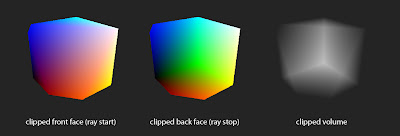
here are some illustrations:
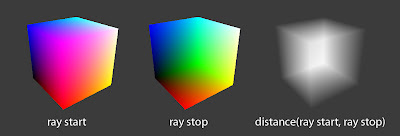


volume clipping with azimuth 124°, elevation -44° and clipPlaneDepth 0.2 values


and a video of it in action

June 8, 2011

ROME "3 DREAMS OF BLACK"

ROME "3 DREAMS OF BLACK" is an interactive film/music clip powered by WebGL

The exciting part is that I got emailed by the lead developer Branislav Ulicny (Altered Qualia) to inform me that he ported my GLSL depth of field with bokeh filer to WebGL. And recently I found out it is being used in this project.

my involvment in video at 2:00 ;)


to see it yourself
go here:
www.ro.me
the tech behind it:
www.ro.me/tech

May 18, 2011

Volumetric TimeLine

This is an old project.
Credit goes to Benoit Bolsee and Dalai Felinto for helping me.

I recently realised that Toneburst has actually made something very similar to this before called Time Cube

May 4, 2011

Procedural Animation System video3 - IK

a third update for my 2D procedural bipedal locomotion system featuring Inverse Kinematics.
You can see that limbs don`t stretch anymore and animation looks a lot more natural now. Though at the moment the "walker" is oriented left only :P, and he walks now also backwards.
I will fix that.

May 2, 2011

Procedural Animation System video2

here is a second update to my 2D procedural bipedal locomotion system for BGE.
Added foot (spheres) for the character so now I got basic walk/run cycle. The correct knee position is not yet implemented. What i have here at the moment is just a bezier curve drawn from hip to foot. so the white stick figure is a rough visual representation of how it may look in the future when it`s done.

May 1, 2011

first steps - 2D procedural bipedal locomotion

I am doing a fully procedural animation system for a platformer game. Here you can see an early work in progress concept for foot placement.

Yellow lines show player velocity and step height, green and red cubes represent footprint placing on ground.


more of this soon..